This workflow covers the complete accounts payable process from invoice receipt through payment confirmation. All invoices flow through the Python dashboard for preprocessing before upload to Monday.com for tracking and approval.
The AP Board in Monday.com tracks all invoices through the payment lifecycle. Each column serves a specific purpose in the workflow.
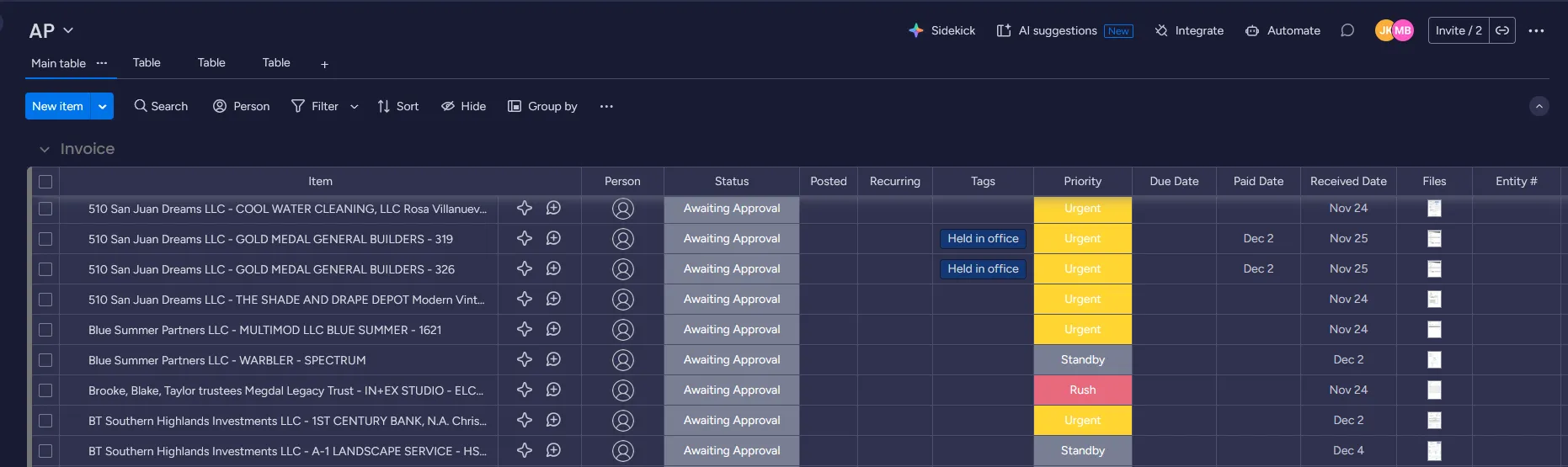
Column definitions:
- Item: Full invoice identifier including entity, vendor details and invoice number
- Person: Team member assigned to process or review the invoice
- Status: Current processing stage (Ready to be Posted, Awaiting Approval, Approved, Posted, Paid)
- Posted: Checkbox to confirm invoice has been posted to accounting system
- Recurring: Identifies recurring invoices that follow expedited approval
- Tags: Classification markers (ACH, Check, Held in Office)
- Priority: Urgency level (Regular, Rush)
- Due Date: Payment deadline based on vendor terms
- Paid Date: Date payment was processed
- Received Date: Date invoice was scanned and processed through the dashboard
- Files: Attached invoice PDF and backup documentation
- Entity #: Reference number for MRI
Initial Invoice Processing
-
Scan hard copy invoices
Front Desk and Office Manager scan all hard copy invoices immediately upon receipt. If more than 10 invoices arrive in a single day, delegate scanning to Data Management for assistance.
-
Save invoice scans
All scanned invoices save to Z:\Shared\Scans\INVOICES immediately after scanning. Digital invoices received via email also save to this location.
-
Run invoices through Python dashboard
Process the day’s invoices through the Invoice Preprocessor at end of day. Complete all naming verification steps before moving to upload.
-
Upload to Monday.com
Upload all processed invoices to Monday.com at end of day or use the Invoice Preprocessor to batch upload the invoices.
Invoice Classification and Workflows
Invoices fall into two categories with different approval requirements. Use the tabs below to understand each workflow.
Utility and recurring invoices do not require owner or management review before posting.
-
Set status
Front Desk and Office Manager set status to Ready to be Posted
-
Mark payment method
Check the appropriate box: ACH, Check, or Held in Office
-
Set due date
Enter the payment deadline from vendor terms
-
Set priority
Mark as Regular or Rush based on due date and vendor requirements
-
Bookkeeper posts
Bookkeeper posts to accounting system and checks the Posted checkbox
-
Controller processes payment
Controller initiates ACH transfers and check signing during Thursday AP Meeting
-
Controller confirms payment
Controller verifies payment processing every Thursday and updates Paid Date
Non-recurring invoices and exceptions require review before booking.
-
Set status
Front Desk and Office Manager set status to Awaiting Approval
-
Mark payment method
Check the appropriate box: ACH, Check, or Held in Office
-
Set due date
Enter the payment deadline from vendor terms
-
Set priority
Mark as Regular or Rush based on due date and urgency
-
Thursday AP meeting review
Invoice goes to Thursday AP Meeting with backup documentation attached
-
Approval decision
President of Asset Management or Owner reviews and either:
- Marks Approved (automatically switches to Ready to be Posted)
- Adds comments for team to resolve issues
-
Follow utility workflow
Once status is Ready to be Posted, follow the same steps as Utility & Recurring invoices (posting, payment processing, confirmation)
Status and Tag Management
The status column tracks each invoice through the approval and payment process, while tags classify invoices by payment method.
Status Options
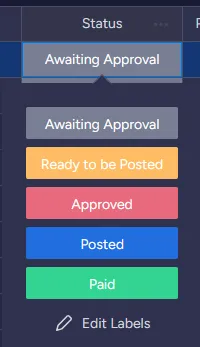
Awaiting Approval Invoice needs management or owner review before posting.
Ready to be Posted Invoice is approved and ready for bookkeeper to post to accounting system.
Approved Management has approved the invoice. System automatically switches status to Ready to be Posted.
Posted Bookkeeper has posted the invoice to accounting system. This status is triggered when the Posted checkbox is marked.
Paid Payment has been processed. System automatically enters paid date and removes from active view after 2 weeks.
Tag Options
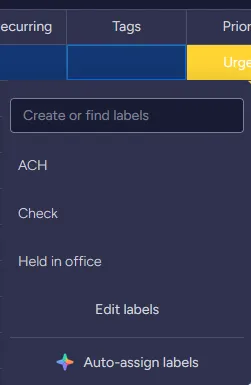
ACH Electronic payment processed through bank transfer.
Check Payment issued via physical or digital check.
Held in Office Physical check held at office location for vendor pickup.
Each invoice receives one payment method tag. The tag determines how the Controller processes payment during the Thursday AP Meeting.
Priority Levels
Priority determines processing urgency and helps the team manage workload effectively. Set priority based on due date and vendor requirements.
Priority options:
- Regular Standard processing timeline, adequate time before due date
- Rush Shortened timeline, approaching due date or requiring expedited processing
Key Workflow Principles
Same-day processing: Complete all steps for invoices received each day before end of business. This prevents backlogs and maintains accurate received dates.
Consistent status updates: Each team member updates status when completing their assigned task. This keeps the entire team informed of invoice progress.
Documentation for review items: Always attach backup documentation to invoices requiring approval. Management cannot approve without supporting materials.
Thursday AP meeting rhythm: All require review items go to Thursday meetings. This creates predictable approval cycles and prevents delays.
Payment confirmation: Controller confirms all payments weekly during Thursday AP meeting. This maintains accurate records and identifies any payment failures quickly.