

Live Chat
Open the chat application installed on your computer to connect with a Logic TCG technician. Your conversation is logged and a support ticket is created automatically.
Logic Technology Consulting Group (Logic TCG) provides IT support for all EMA staff. You can reach them through live chat, phone, or email. All three channels create a support ticket automatically.
Live Chat
Open the chat application installed on your computer to connect with a Logic TCG technician. Your conversation is logged and a support ticket is created automatically.
Phone
Call 424.226.1688 and select Option 1. Your issue is logged immediately, a ticket is created, and a qualified technician is assigned to resolve your request.
Send an email to support@logictcg.com. A ticket is created, triaged, and assigned to a technician who will follow up with you.
Live chat runs through Logic Chat in Microsoft Teams. This is the fastest way to reach a technician for most issues.
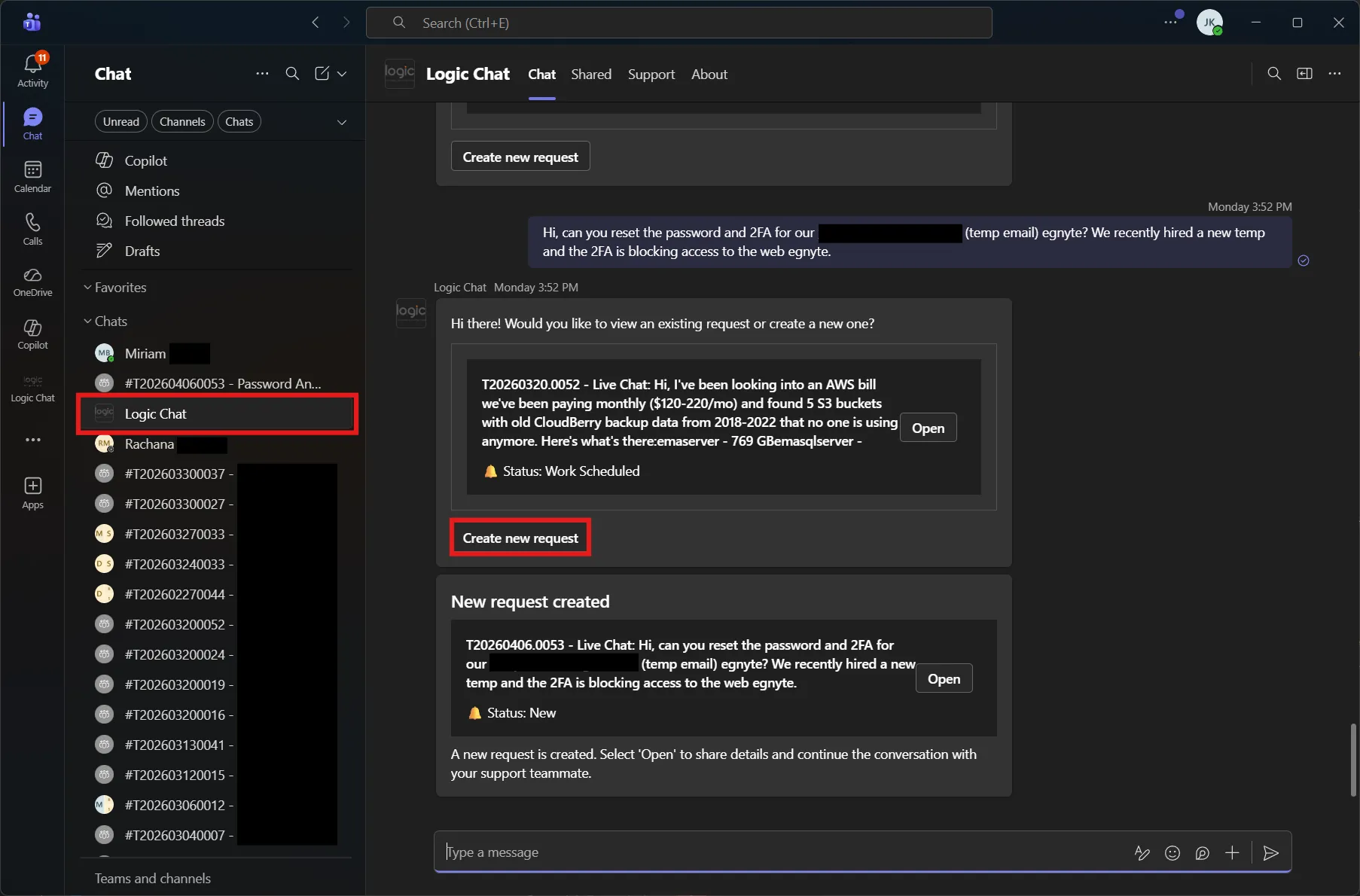
Open Logic Chat In the Teams sidebar under Chats, click Logic Chat.
Describe your issue Type your message in the chat and send it.
Create a new request If a pending ticket is displayed, click Create new request to start a new one. A ticket is created automatically with your message.
Follow up For any follow-ups, find your ticket in the chat list on the Teams sidebar and continue the conversation there.